Essential 3D Scanning & Processing Software
Artec Studio Lite is the fundamental toolset for capturing and processing 3D data. It provides the
core features needed to scan, align, and export 3D models without the complexity of advanced
metrology tools.
Ideal for beginners, education, and simple digitization tasks, it ensures you get high-quality
geometry and texture with a streamlined workflow.
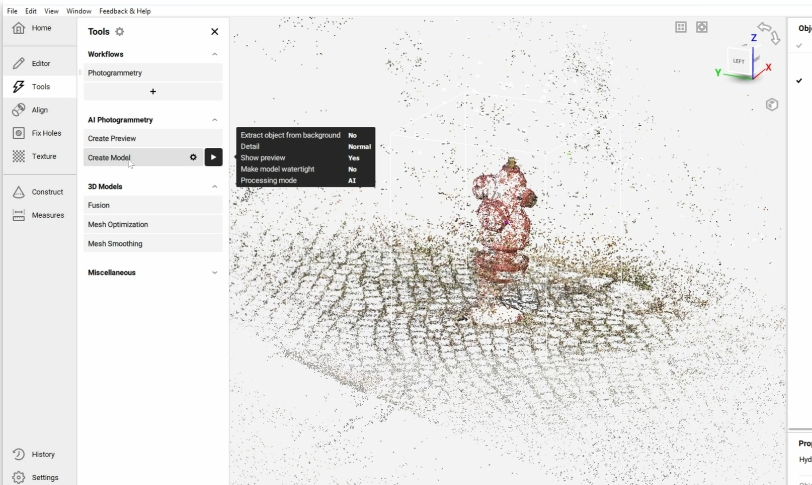
Artec Studio Lite is designed for simplicity and efficiency. It strips away the complex industrial features to focus on what matters most: getting a clean, textured 3D scan. It is the cost-effective choice for users who need reliable scanning capabilities without the steep learning curve of professional metrology software.
Seamlessly capture 3D data with supported Artec scanners using robust tracking algorithms.
Apply high-quality color texture to your 3D models for realistic visualization and archiving.
Essential tools to fill holes, smooth surfaces, and simplify mesh complexity for optimized files.
Export your finished models directly to popular formats like OBJ, STL, and PLY for 3D printing or rendering.
Simple steps to a perfect 3D model.
Capture your object in real-time. The software tracks geometry and texture automatically.
Quickly align multiple scans to create a complete 360-degree model of your object.
Merge all data into a single, watertight 3D mesh ready for texturing.
Apply photorealistic color to the mesh to bring your digital model to life.
Save your file in standard formats compatible with almost any 3D software.
Contact our experts to get started with Artec Studio Lite today.
Get a Quote